ON AIRRAP STUDIO

Hotel Lobby AI Video

Upload two front photos — the duo video lands in My videos.

Front Photos

Private upload · used only for your video. Sample photos stay local.

15s HD video with sound · 100 credits

From 2 photos to 15s AI video

Input 1 · Left
Input 1 · Left
Input 2 · Right
Input 2 · Right

How to use the Hotel Lobby AI Video Generator

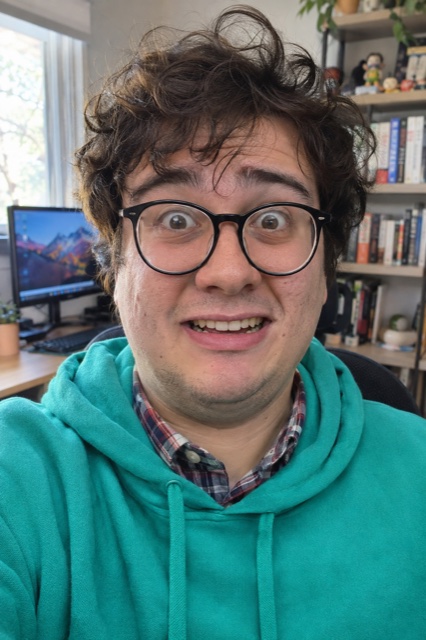
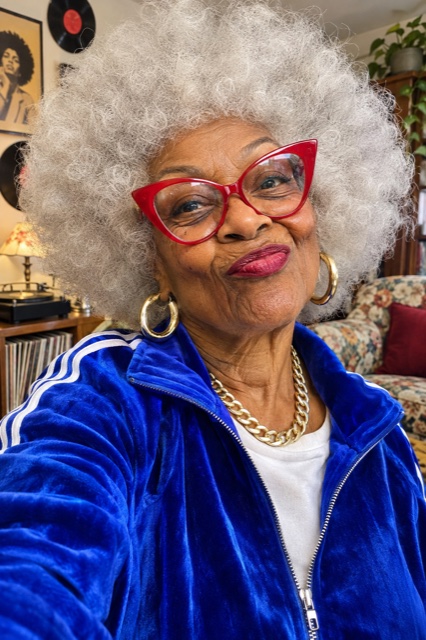
  1. Prepare two independent, evenly lit portraits

    Choose a separate chest-up photograph for each performer rather than putting a group shot into both slots. Face a window so soft light reaches both cheeks, keep the camera level with the eyes, and leave the hair and shoulders visible. A plain wall is useful because it separates the silhouette from the background. Check the originals at full size before uploading: a face that looks blurry there will not gain detail just because it is animated.

  2. Match each person to a slot and check the reference

    Place one person in the left upload slot and the other in the right. Compare the previews with the static sample portraits above. Independent images reduce ambiguity about which face belongs to which performer; they cannot guarantee that every generated frame will preserve identity. Watch the original and sample to understand the fixed orange booth, hanging microphone, and duo composition. Hotel Lobby AI uses its configured template, so there is no prompt box to complete.

  3. Generate, review the whole clip, then download

    Confirm permission to use both photographs, sign in, and check your available credits before starting. The intended output is approximately fifteen seconds, while processing time varies. Open the finished result in My videos and inspect the opening, middle, and ending for facial consistency and motion. Download a copy before its retention period ends. If the task fails, its credits are returned automatically; review the source portraits before deciding whether to try again.

Hotel Lobby AI photo fixes: glasses, side profiles, and merged faces

Clear prescription glasses can work when the eyes remain visible, but lens glare and thick frames hide useful detail. Take a second photograph without glasses if reflections obscure the pupils. Avoid sunglasses, strong beauty filters, hands over the mouth, and hair crossing the eyes. A sharply lit side profile may look stylish as a photograph yet provide too little information about the other half of the face for this front-facing workflow.

If two people blend together or one identity dominates, first replace a crowded source with an individual half-body portrait. Keep similar framing and lighting across the pair, without cropping so tightly that the forehead disappears. Change one input at a time so you can identify what helped. No photograph or prompt guarantees a perfect result; a useful comparison checks recognizable facial features throughout the motion, rather than judging only the first frame.

Portrait preparation and prompt examples

Three practical Hotel Lobby Video ideas

Friends in different cities: ask each friend for a new chest-up portrait against a simple background. Matching camera height makes the pair easier to compare, even when the originals were taken in different rooms. Use the finished duo as a playful reunion message, then send it privately for approval before posting. This is a suggested use case, not a claim that the tool offers a custom reunion scene.

A birthday surprise: pair the birthday person with a consenting friend and let the contrast between ordinary portraits and a staged rap performance carry the joke. Add the name, date, and greeting in your usual video editor after downloading. The studio does not promise custom spoken birthday lyrics, editable choreography, or an exact likeness. Leave captions away from faces and the microphone so the visual punchline remains readable on a phone.

A couple’s anniversary: choose two independent photographs from the same occasion, rather than cropping both faces out of a tiny group picture. Similar exposure and unobstructed expressions give the model a clearer starting point. Preview the clip together before sharing it with family. For the full upload sequence and the checks to make after rendering, follow the walkthrough linked below instead of experimenting with several paid attempts at once.

Follow the two-photo generation tutorial

Private uploads and transparent one-time pricing

Hotel Lobby AI uses credit packs rather than an automatic monthly subscription. One standard video uses 100 credits. Current packs are 1 video for $9.90, 3 videos for $19.90, 5 videos for $29.90. Credits do not expire, so buying a larger pack does not require using every attempt during the same visit. Compare the total checkout amount and the number of videos you actually want, rather than assuming a larger purchase is always better value for your situation.

Uploaded photographs are stored privately. Photos are deleted automatically after 7 days. Videos are deleted automatically after 14 days. Finished clips appear in My videos rather than a public gallery. These storage windows are separate from your credit balance: unspent credits can remain available even after a particular clip has expired. Download anything you want to keep, and use only images that both people have agreed you may upload.

Compare current credit packsRead the privacy policy

Frequently asked questions

What does the Hotel Lobby AI generator actually make?

It creates a short two-person performance from two source portraits using the configured orange-booth template. The reference and sample above show the intended composition. Treat the output as a creative AI interpretation: resemblance, gestures, and timing may vary, and the page does not promise an exact copy of the reference performance.

Can I use one photograph containing both people?

Prepare two independent images instead. A crowded photograph gives the system competing faces and can make identity assignment less clear. If a shared original is your only option, create a separate crop for each person, keeping the full face and enough shoulder detail. Avoid enlarging tiny faces from a distant group shot.

Do glasses or a side-facing portrait cause problems?

They can reduce the visible facial information. Choose a direct view with both eyes clear, avoid reflective lenses, and retake strongly angled portraits when possible. Soft frontal light is more useful than a dramatic silhouette. Try an unobstructed original before spending credits on repeated attempts with the same difficult photo.

Is a prompt required for Hotel Lobby AI?

No. The generation flow takes photographs and uses a preset performance template. The separate prompt guide contains original scene-writing examples for experiments in other tools; copying those examples does not change this studio’s background, outfits, duration, or motion. Focus on improving the two source images here.

How much does one Hotel Lobby Video cost?

A standard task uses 100 credits. Current one-time packs are 1 video for $9.90, 3 videos for $19.90, 5 videos for $29.90. There is no recurring subscription and unused credits do not expire. Check the pricing page before buying so the pack you choose matches the number of attempts you intend to make.

Will a failed task use up my credits?

A failed generation task returns its credits automatically. Check the task status and balance before submitting another attempt. A completed clip with an imperfect expression is different from a failed task; this policy does not promise a free rerender for every aesthetic preference. The refund policy explains purchase-related terms separately.

Are my portraits added to a public gallery?

No. Uploaded media and generated results are stored privately, with finished clips available in My videos. Photo retention is 7 days and video retention is 14 days. Download your result while it is available, and review the privacy policy for details about processing and storage.

Can I change the music or add birthday lyrics?

This template keeps its configured original audio. It is not a custom lyric-writing or voice-recording interface. Add a written greeting or your own edit after downloading, and check any permissions needed for your intended use of the soundtrack. A generated performance alone does not grant rights to third-party music.

Where should I start if my first result looks wrong?

Check whether both source faces were sharp, frontal, and isolated. Replace the weaker portrait before changing both images. Compare identity at several points in the clip, because a good opening frame can still lead to unstable motion. The tutorial provides a practical checklist for preparing another attempt without guessing at prompt settings that this tool does not expose.