ON AIRDANCE STUDIO

Sticky Bubblegum Dance AI Video

Upload one full-body or standing photo — your 10s HD dance video lands in My videos.

Your Photo

Private upload · used only for your video. Sample photo stays local.

One photo. A playful dance.

50 credits per 10s 720p dance · $9.90 Starter makes 2 HD clips

10s 720p dance with sound · 50 credits · $9.90 for 2 HD clips

One photo · Ten seconds

From portrait to playful dance

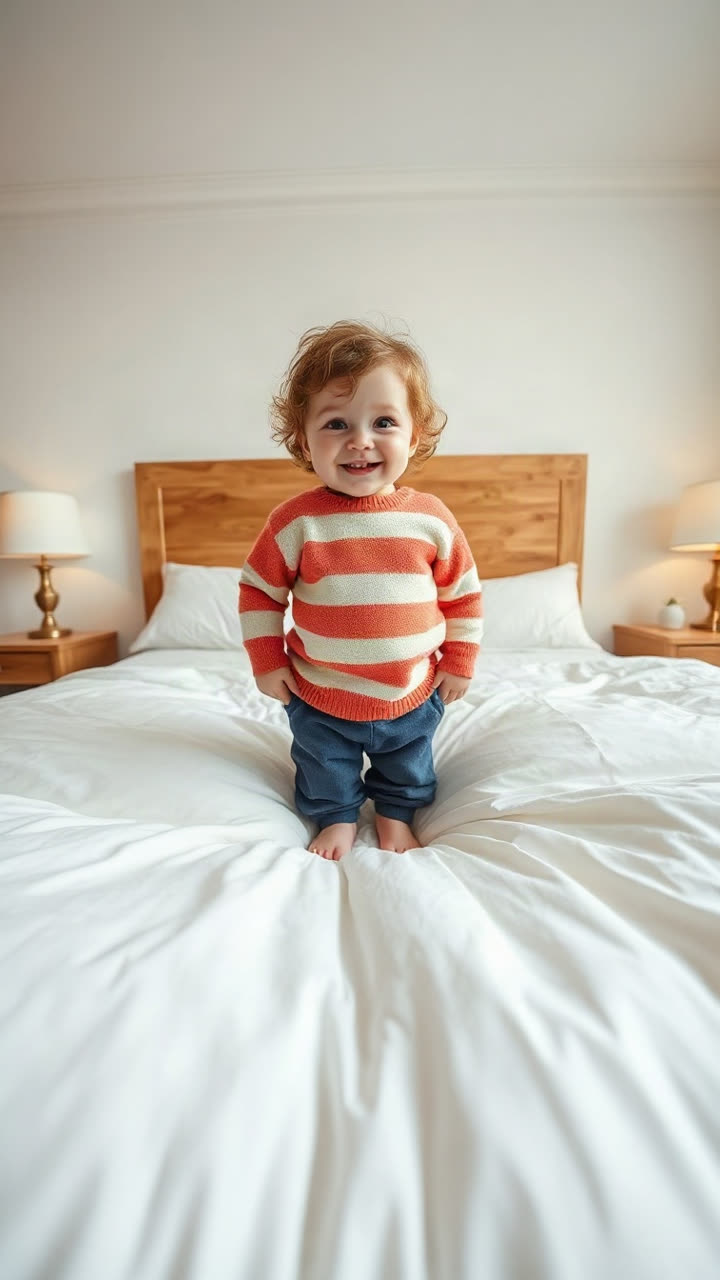
Sticky Bubblegum AI example portraitBefore · 1 Photo
Example Photo
After · 10s HD
10s Dance Video
Claps · Sticky Tummy · Side Kicks · Cheek Pose · Remix Audio

How to use Sticky Bubblegum Dance AI in three steps

  1. Choose one clear photograph

    Start with one person facing the camera in a bright, uncluttered photograph. Show the face clearly and include the body and arms where possible so the model has useful visual information for the movement. Upload only a picture you have permission to use; if it shows a child, obtain consent from their parent or guardian.

  2. Check the sample and start your video

    Watch the example to understand the rhythm and movement that Sticky Bubblegum AI follows. Sign in, upload your image, confirm permission, and check your balance before generating. Each attempt uses 50 credits for a vertical 10-second 720p clip, with no prompt or separate driving video needed.

  3. Review, download, and share thoughtfully

    When processing finishes, open the result and look at the face, hands, clothing, and the start and end of the routine. Listen to the soundtrack using the player controls. Download the MP4 from My videos if you want to keep it; stored videos are deleted after 14 days. Before posting anywhere, confirm that you have the necessary permissions for the person, image, and audio.

A baby sticky bubblegum dance generator without CapCut

Sticky Bubblegum Dance AI turns one still portrait into a short, vertical 720p interpretation of the viral icky sticky bubble gum dance routine directly in your browser without CapCut. Whether you call it an AI baby dance video generator or a single-photo sticky bubble gum dance maker, expect clapping, bouncy knees, wide arms, hands on the tummy, a pretend sticky pull, side kicks, a playful cheek pose, and a cheerful finish.

The motion-control model aims to keep the subject’s face, hairstyle, natural toddler or adult body proportions, and outfit consistent with your uploaded photo. Generated motion can still shift fine details such as fingers or clothing edges, so treat the clip as an AI remix rather than real footage and review every result before sharing.

Sticky Bubblegum AI independence and responsible sharing

Not affiliated with Ms. Rachel, Songs for Littles, TikTok, or CapCut. CueSkit is an independent tool. Avoid presenting a generated clip as an official recording or as a statement by any person or organization.

You are responsible for making sure your use of the portrait and soundtrack is appropriate for the audience and platform. A generated result does not itself grant music rights, publicity rights, or permission to represent someone else.

Choose a portrait for Sticky Bubblegum AI motion

A front-facing picture with even daylight, visible eyes, and a relaxed expression is a practical starting point. Keep the head, shoulders, and as much of the body as possible inside the frame. A standing pose and enough space around the arms can make the intended gestures easier to interpret.

Use the original image when possible instead of a heavily compressed screenshot. Strong filters, large sunglasses, crowded backgrounds, or multiple competing faces can confuse the result. If the first completed clip drifts, compare the source at full size and change one thing at a time: lighting, framing, or the selected portrait.

Sticky Bubblegum Dance AI credit packs and HD output

Each 10-second dance costs 50 credits. The $9.90 Starter pack contains 100 credits, enough for two dance videos; the $19.90 pack contains 300 credits, enough for six; and the $29.90 pack contains 500 credits, enough for ten. These counts assume the whole balance is spent on this template. Registration adds no generation credits, packs are one-time purchases, and purchased credits do not expire.

The same wallet also works with other templates: a five-second 720p snow-globe effect costs 20 credits, and a fifteen-second duo video costs 100 credits. You can mix them until the balance is used, although a remaining balance below a template’s cost cannot start that template. A failed generation returns its credits automatically; an aesthetically imperfect completed clip is different from a failed task.

Compare all credit packsOpen the AI Snow Globe studioExplore the featured duo generator

Save and share your sticky bubblegum dance video

A short dance can work as a private family surprise, a playful birthday greeting, or a starting point for an edited montage. Keep the context clear: the movement is generated, and the person in the picture did not necessarily perform it.

Uploaded photos are stored privately and deleted automatically after seven days. Generated videos are kept in My videos and deleted after fourteen days. Download anything you want to keep before that window ends. These media retention periods do not change the balance or expiration of purchased credits. If a task fails, check its status and returned balance before deciding whether to try again.

Follow the dance tutorialRead photo and prompt tipsExplore the dance format

Frequently asked questions

What is Sticky Bubblegum Dance AI?

Sticky Bubblegum Dance AI is a preset image-to-video template that animates one portrait into a playful 10-second 720p vertical dance with sound. Compare the sample above to preview the routine, noting that individual faces and gestures vary.

How many photos do I need?

You need one photograph with one clear subject. A front-facing image with visible facial features and space around the body is a good starting point. The sample photo is available if you want to inspect the upload experience first.

Does the video include sound?

The template is configured to add its rhythm track to the generated video. Use the player’s sound control to listen or mute playback. If an audio merge is rejected, the generated video may be delivered without the intended track.

How much does one dance cost?

One dance uses 50 credits. The $9.90 pack provides 100 credits for two dances, the $19.90 pack provides 300 for six, and the $29.90 pack provides 500 for ten, when used entirely on this template.

Can I generate a video without buying credits?

Viewing the example and preparing a photo do not create a video. Generation requires paid credits, and registration adds no generation credits. Packs are one-time purchases, and unused purchased credits do not expire.

What happens if generation fails?

A failed task automatically returns its credits to your balance. Check My videos and your wallet before submitting again. A completed video with a different expression or an imperfect hand is a completed result, not necessarily a failed task.

Can I use a picture of a child?

Only upload an image you are authorized to use, and obtain the parent or guardian’s consent for a child. Consider the child’s privacy and the intended audience before sharing. The model aims to preserve natural age, but results still need review.

Where are my images and finished videos kept?

Photos are stored privately and deleted after seven days. Generated videos appear in My videos and are deleted after fourteen days. Download a copy in time if you want to keep it, and do not treat the service as permanent storage.

Can I make this dance video without CapCut or custom prompts?

Yes. Sticky Bubblegum AI runs in a mobile or desktop web browser without installing CapCut or writing prompts. The studio applies its preset motion reference and soundtrack automatically; see the photo guide if you want prompt examples for other tools.